Showing posts with label Google Search. Show all posts

Saturday, December 12, 2009

Universal Search in Suggest


Now you can get answers directly from Google's search box without even hitting enter. Now when you're searching for the weather, flight status, local time, area codes, package tracking, answers, definitions, calculator, currency and unit conversions, Google would display the Universal Search results directly in the suggestion box. Learn more

This move makes much sense as the idea of Universal Search is to deliver "smack on" answers to common queries. Why require users to hit one more button, load a new page before you can get answers to simple questions? And for Google, more relevant results means improved user experience resulting in an increased user loyalty and switching cost.

Sunday, May 11, 2008

Happy Mother's Day

The Mother's Day doodle is up in Google Hong Kong and China:
If you search for Happy Mother's Day on Google, you would see the power of OneBox as you would see related searches, iamges, news and blog posts all mixed together. ;)

Friday, February 15, 2008

Video Ads Test in Google Search Results

According to New York Times, Google is testing videos ads in its search results. Google is also testing ads that uses images, interactive maps and other more elaborate features.

At first, users will barely notice the change because the videos will not be immediately obvious. Ads with accompanying videos will have a small button with a plus sign. Google has increasingly used the plus icon to indicate that certain information — such as a map — can pop up on a search results page. Users that click the plus button on an ad will see a small video player that shows a commercial, movie trailer or other clip.

For now, advertisers will not pay extra to put video in the ads. They enter a price they will pay for a click in Google’s regular text-ad auction. But in the video ads, the advertiser pays when users click to see the video, even if they never click through to the advertiser’s site.

“People who advertise a movie want to show a trailer. Why shouldn’t they have the same format we use for search results and have a little plus box that says watch the trailer?” said Marissa Mayer, Google’s vice president of search products and user experience.
There is no official word from Google at the moment.

Monday, December 31, 2007

Real Time Flight Status

Google's flight stats search feature now delivers real time status and information in the search result OneBox. Just type the name of the airline and flight number (e.g. American 123, ua226) into the search box and you shall see something like this:
The information is provided by FlightStats.com which uses data feeds from the US Federal Aviation Administration's (FAA) Aircraft Situation Display to Industry (ASDI). I have tested it with some flights departing from Hong Kong and it works fine so I guess it is available for all international flights.

Wednesday, December 5, 2007

Google Customized for iPhone

Google has done a lot of customization to make its online applications look good on iPhone. Gmail supported IMAP. Gmail, Google Calendar and Google Reader made its interface iPhone-friendly. According to TechCrunch, they now integrate all these apps into one page if you visit Google.com in your iPhone:
Maybe a lot of Googlers are using iPhone themselves ...

Sunday, October 28, 2007

PageRank Updated: Massive Drops

Google's search engine secret sauce, the PageRank algorithm, finally gets an update after 6 months since its last update. Normally, PageRank updates every 3 months. There have been reports about a massive drop in sites that are widely known to be selling text links which Google identifies as manipulating search engine results. There have also been reports that YouTube's PageRank drops to 3.

Side note: You will now receive a confirmation if you submit spam or paid links report in Webmaster Tools which says:

Thank you for submitting a spam report for this site: [submitted URL]

We take the quality of our results very seriously, and we thoroughly investigate every report of deceptive practices and take appropriate action when we uncover genuine abuse. In especially egregious cases, we will remove spammy websites from our index immediately, so they don't show up in search results at all. At a minimum, we'll use the data from each spam report to improve our site ranking and filtering algorithms, which, over time, should increase the quality of our results.

We appreciate your taking the time to help us improve our service for your fellow users around the world. By helping us eliminate spam, you're saving millions of people time, effort and energy.

Friday, October 26, 2007

SearchMash Goes Flashy

SearchMash, the experimental site operated by Google to test new searching experience, had a recent upgrade. Instead of the previous simple HTML version, they launched a flash version which is very unlike Google's usual practice of keeping things simple. However, SearchMash is still kept ad-free. The new interface is a complete makeover adding more interactive elements.
Here is how it looks like when you search for 'iPhone':
SearchMash implements Snap Shots preview technology so that a preview is shown on the right (which is called the 'preview area') together with site information as well as other typical functions such as search within site and go to cache page. You may navigate the results by clicking on them, using the arrow keys on your keyboard, or by scrolling. To open a result, you will have to double-click. And when you open a result, SearchMash follows you by adding a frame at the top:
To go to image results, simply click on the 'Image' tab and without loading the entire page, only the search result section would reload. You will still get a preview of the site that hosts the image as well as the size (width and height) and file name:
And just like web search, you will have to double-click the image to open results. For video results, I personally think it is the most useful and user-friendly. Instead of a preview, you can actually watch videos hosted on YouTube or Google Video on the right using the embedded player without leaving the results. Useful information about the video such as the title, author, duration and description are also shown. Similarly, you navigate by either clicking, using arrow keys or scrolling:
SearchMash brings Google Maps right into the search results. They kept the familiar interface and everything works exactly the same expect it is much faster and interactive:
SearchMash also provides more specific searches such as Wikipedia and blog search. You can see them by clicking on the "More" menu. You can view your search history, change your search preferences in the menu on the left.

Friday, October 12, 2007

Google Continues to Top in Global Search

Chart of Search Engine Market Share August 2007According to comScore, Google continues to top global search charts with 37.1 billion searches in August dominating over 60% of the worldwide market.

More Related News

Tuesday, September 4, 2007

Strange YouTube Video Description in Google

Pay attention to the description of the video! It reads '8 clicks from http://tstkeith.blogspot.com/2007/05/ ...'. Pretty obvious it is some referral statistics from YouTube. This suggests that YouTube has been putting its referral statistics in public allowing (extremely powerful) search engines like Google to access this information. I tried some other keywords but it doesn't seem to trigger the same "description". Could you find other keywords that produces the same (strange) video description? Or do you have other opinions about this phenomena?

Friday, July 13, 2007

Google to Add 'Unavailable After' META Tag

The director of crawl systems at Google, Dan Crow is releasing a new META tag named "unavailable_after".

Easily understood from the name, the "unavailable_after" tag will tell Google when Googlebot should no longer crawl that page. It is especially useful for limited time offer promotional pages where the promotions will expire on a specific date. By using the "unavailable_after" tag, you can tell Google not to crawl these pages, after the promotions expire.

[Via Search Engine Land]

Saturday, June 9, 2007

Google Beats Baidu in Blind Test

Google ChinaAccording to a blind test conduct by Beijing-based China IntelliConsulting shows that Google’s Chinese search surpasses local competitor Baidu.com in terms of search results quality.

Google achieved an overall satisfactory rating from 48.2% of the 2,740 Web surfers who participated, beating Baidu’s 39.8%. Participants in the test accessed the search engines through pages that disguised the companies' identities.

The quality of their search results were rated for the eight most common types of searches in China: news, Internet and technology, finance and business, entertainment, shopping and dining, travel and transportation, science and education, and government services and public information. Google is ahead of Baidu in all categories but entertainment, suggesting Baidu has a better understanding of the music and movie tastes of Chinese Internet users.

The survey also find out that users were most dissatisfied (scoring a 30.3% disapproval rate) with the connections to Google.cn have been highly unstable, particularly during the test period, when it was periodically blocked by Chinese censors, resulting in blank pages and slow speeds.

Google was also complaint about its failure to provide page-caching in China, the absence of a search function for free downloads of music in the MP3 format and for not providing a popular chat-room like message posting board called post bar.

I suppose Google China is trying very hard to catch up with in entertainment and other local search services by launching Life Search (the Chinese version of Google Base) in China.

Related: Copy of Report Chinese | English

Monday, May 28, 2007

News Summary

Bigger Attachments in Gmail
You can now send emails with attachment up to 20MB. You have to be aware, however, that this is also restricted by the recipient's attachment size limit (e.g. standard Yahoo Mail and Hotmail accounts only allows attachments under 10MB).

Related: Official Google Blog | Gmail Help Center


New Google Talk Smileys
You can now choose from a wider range of emoticons in the Google Talk gadget, the Flash-based gadget launchable in a new browser window, or embeddable on iGoogle and elsewhere. Switch between different smileys by clicking the smiley picker at the bottom right of the Google Talk gadget (there’s 35 smileys and icons all in all, from devil to broken heart to crying and shock). Google offers three basic sets: animated yellow round smileys , animated yellow square smileys and static black & white smileys.

Related: Official Google Talk Blog | Launch Google Talk Gadget


Google Calendar in Mobile Devices
Just visit calendar.google.com from your phone, and you'll see your agenda of upcoming events, complete with details like date, time, location, description, and guest list.
Related: Official Google Blog


Google Cross Language Search
Now, you can search for something in your own language (for example, English) and search the web in another language (for example, French). Currently, it only supports 12 languages including Arabic, Chinese (Simplified), Chinese (Traditional), English, French, German, Italian, Japanese, Korean, Portuguese, Russian and Spanish. This tool is designed for majority of Internet users out there who are non English speakers to the obtain the gist of information in a language you might otherwise be unable to access majority of the content on the internet which is still in English.

Related: Official Google Blog| Google Translate

Search for Faces or News only
Google Image now allows users to restrict search results to faces-related or news-related images. You can search for faces by adding &imgtype=face behind the search results URL and Google uses face detection technology to select only images that contain faces. If restricted to news related images, it will include only images posted to news sites like BBC or New York Times. Here is what you get if you search for "Google" but restricted to face-related images:
Try it yourself. Enter keywords below:


Thursday, May 17, 2007

Google Searchology - Marching Towards Universal Search

Today is a big day for Google with all the exciting announcements that further enhances the core of Google's great empire - search. From day one, Google aimed themselves to become the universal search engine that ultimately search across all its content sources, compare and rank all the information in real time, and deliver a single, integrated set of search results that offers users precisely what they are looking for. Beginning today, Google will incorporate information from a variety of previously separate sources – including videos, images, news, maps, books, and websites – into a single set of results.

"At first, universal search results may be subtle. Over time users will recognize additional types of content integrated into their search results as the company advances toward delivering a truly comprehensive search experience."
- Google Press Release

Here are the three major upgrades:

The Power of Google Technology
Google has begin their first stage of an upgraded ranking mechanism (PageRank) that automatically and objectively compares different types of information. As always, Google search results are ranked automatically by algorithms to deliver the best results to users anywhere in the world. Most of this innovation addresses basic ranking algorithms and is often not obvious to users. Users just see more accurate results, more often, in more languages, which is our primary goal.

New Navigation Features
New dynamically generated navigation links have been added above the search results to suggest additional information that is relevant to a user's query. For example, a search for "python" will now generate links to Blog Search, Book Search, Groups, and Code, to let the user know there is additional information on his or her query in each of those areas. As a result, users can find a wider array of information on their topic, including data types they might not have initially considered.
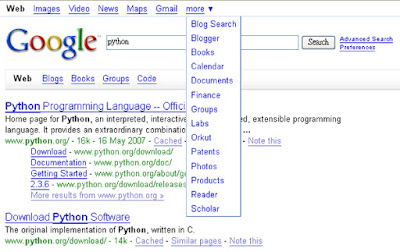
Google's homepage and a number of applications (e.g. Gmail and Picasa Web Album, etc.) have also been updated with a new navigation bar on the top of the screen to provide easier access to popular Google products. Now, instead of having links above the Google.com homepage search box, users will see a navigation bar on the top left side of the page with various Google search properties and popular products including Gmail, Google Calendar, Docs & Spreadsheets, and Picasa Web Albums.

Experience the Experiments
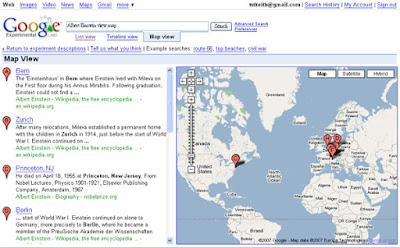
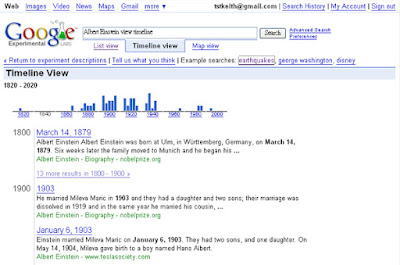
Google also announced today a new experimental version of its popular search service called Google Experimental, available on Google Labs. This new test site provides users an opportunity to try out some of the latest search experiments and innovations and provide Google with feedback. One of the first experiments to be featured on the site enables users to view their search results on a map or timeline. For instance, when someone searches for "Albert Einstein" on Google Experimental, they can choose to view the search results on a map that shows locations mentioned within web pages about Albert Einstein or on a timeline that illustrates the history of Albert Einstein's life.
Related: Press Release | Official Google Blog | Search Engline Land

Saturday, May 12, 2007

News Summary

Google explains why anonymize server logs only after 18–24 months
They came up with three major reasons:

  1. Improve our services: So they could know that you typed Google as Googel and gives relevant 'Do you mean ... ?" suggestions.
  2. Maintain security and prevent fraud and abuse: To prevent sabotage and to detect and prevent phishing, scripting attacks, and spam such as query click spam and ads click spam.
  3. Requested by law: To obey existing and proposed laws and regulations such as the EU Data Retention Directive and the US 24-month data retention laws.
View Original Post | Related Previous Posts

Google changes tagline to 'Search, Ads, Apps'
Reuters reports that according to Google's Chief Executive Eric Schmidt's presentation to investors ahead of Google's annual shareholder meeting:

Google Inc.'s corporate tagline has become "Search, Ads and Apps," reflecting a shift beyond search and advertising into online software applications, its chief executive said on Thursday.

Related: Search Engine Land | New York Times

Monday, February 26, 2007

Google Spell Checker

People make mistakes when they are typing their search queries. Google tries to correct them by their own spell checker which is based on 'occurrences of all words on the Internet'. This automated process of identifying typos means that there are chances that Google would wrongly flags correctly spelled words and tries to suggest a irrelevant alternative. In the screenshot, for instance, 'chile's population' (which is correctly spelled) is being flagged as a typo and Google tries to suggest 'china's population' as an alternative. Obviously in this case, where China being the most populated country in the world would definitely have a higher occurrence in all the words on the Internet (searching for 'China' in Google return approximately 639,000,000 while 'Chile' only returns 211,000,000). To improve the situation, Google users can: give feedback on ridiculous suggestions using the 'Dissatisfied? Help us improve' link at the bottom of the search result page. While Google can lower the minimum word occurrence which flags keywords as typos.

Google PlusBox

Google aims at giving users the most relevant content in search result pages. Larry Page, co-founder of Google, stated that a"perfect search engine," is defined as something that, "understands exactly what you mean and gives you back exactly what you want.". Long ago, Google displays OneBox above search results which are information Google identifies as most relevant to specialized information like weather and stock quotes. In the past few months, they extend this idea to something bloggers name it 'PlusBox' or 'ManyBox' which basically is similar information provided in OneBox displayed in an expandable box after individual search results. Currently, PlusBox works for stock quotes, in-site search, maps and directions, related blog posts about corporates, etc. Lately, they experimented videos on PlusBox which means users can play videos hosted in popular videos sharing sites (e.g. YouTube and Google Video) on the search result page. Here is how users benefit:

  1. Some users might be searching for simple answers to they query like an address of a hotel or wanting to watch the famous mentos in coke experiment. Conventionally, they will have to search, click on the top ranked results, redirected to a external site and then look for what they want again. With PlusBox, you never need to leave the search results page yet getting the most relevant information.
  2. In some cases, PlusBox displays more related internal links for a certain site which gives users a basic idea of what the site is going to provide and thus helps them quickly narrow down targeted sites.
  3. As mentioned above, PlusBox might show related blog posts or other related information which means users who are still struggling with what they are what to search for can have a glimpse of information beyond their query.
Apart from PlusBox, Google is actively doing experiments with a site called searchmash which integrates all sorts of results (e.g. image, blogs, wikipedia, videos) in one page. Google Operating System forecasted that Google might add in a Google Scholar PlusBox that shows information about scholar papers: the abstract, the number or quotes, the number of pages and links to Google Scholar. I would suggest:
  • Google Books PlusBox that shows books that mentions the keyword as well as information about the book such as table of content, preview of selected pages and search within book.
  • Google Image PlusBox that will display images within a site that Google think is related to the search term.
  • Google Paten PlusBox which is similar to the Books PlusBox but shows related patent information like patent summary, citations and drawings.
While Google is marching towards its ultimate goal as a 'perfect search engine', more testing will go on.

Tuesday, January 9, 2007

Google Rescues Canadian Child from Abuse

Google now got a new, even more astonishing story to add to its testimonial page. This time, Google helped rescue a child from an allegedly sexually abusive situation. According to BBC News, the child typed in 'kids helpline' (the official name of a children's organization in Canada) into Google Search and an anonymous e-mail plea for help was then sent to Australia and later forwarded to Canada. Canadian police tracked the location of the computer with its IP address and rescued the child. Google's search engine has been praised by many of its high relevance and this once again was proved by real life scenarios. If you also have a story about Google, you can submit it here.

Tuesday, December 26, 2006

Google Self-Advertising Products

Google has been buying AdWords ads for its products in hopes to diverge traffic from its most popular product -- search to other services. I have done several searches trying to dig all the AdWords ads Google use to advertise its own products (see below for the products I have dug). I concluded that most these products that Google actually spend money competing with other advertisers are either unpopular and has a low market share or the Google version of that product for that particular keyword ranks pretty low (e.g. If you search for 'calendar', Google's calendar service ranks third). And recently, they even added something call 'Tip' which appears right below the search box when users search for particular keywords to promote its four products: Google Images (for searching images), Google Calendar (Google's web-based calendar service), Blogger (Google's free blogging service which recently went out of beta), Picasa Web Album (Google owned online album which provide one-time 250 MB of storage).

So far, I have dig these products which Google self-advertise: AdSense, AdWords, Google Toolbar, Google Talk, Google SketchUp, Picasa, Google Blog Search, Google Desktop, Google Pack, Google Calendar and Blogger. Have I missed any?

Monday, December 18, 2006

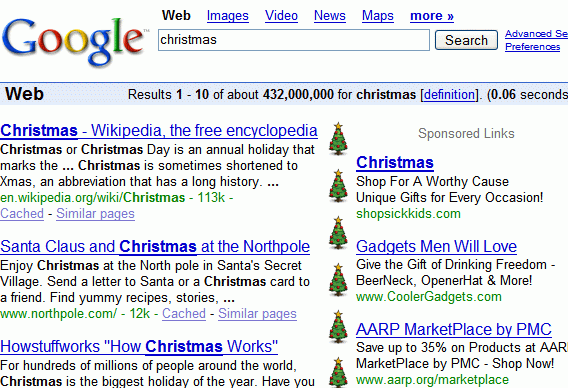
Christmas arrived in Google search results

There is still a week till Christmas but Google has already started celebrating the holiday by showing candles and trees on the borderline between search results and ads for queries like Christmas, Hanukkah and Kwanzaa this would definitely draw more attention to the ads and more likely will users click on them. Is Google trying to boost its advertising revenue before the end of year?

Screenshot from Google Operating System